

Discover the leading anonymous video hosting platforms in 2026. Learn what truly makes video hosting anonymous, why it matters for privacy, and how the top five services- Waya Stream, VdoCipher, Spotlightr, Vimeo Business, and Castr protect your content and identities.
In today’s world, uploading a video to any public or private platform usually means the platform can index, track, and even monetize your content and viewer data.
By contrast, genuine anonymous video hosting keeps your videos unindexed and unsearchable, and ensures that neither the uploader’s nor the viewers’ identities are exposed or sold to third parties.
Many people mistakenly believe that setting a video to unlisted on YouTube or Vimeo makes it private; in reality, unlisted links can still be forwarded or tracked and are not protected by any token or encryption.
This guide dives straight into what anonymous video hosting really means, highlights the key features to look for like expiring links, end-to-end encryption, DRM, and watermarking, and then compares the top 5 platforms of 2026 that deliver on those promises.
If you’re a journalist, whistleblower, healthcare or legal professional, enterprise user, or any content creator who values privacy over reach, this guide is for you.
Key Takeaways
- True anonymous video hosting means content is never indexed or tracked, and the platform itself does not record identities.
- Private video is not the same as anonymous video: Unlisted or password-protected videos can still leak or be tracked. Only tokenized, encrypted hosting offers real anonymity.
- Expiring links and DRM form the baseline of secure hosting. Any professional platform in 2026 should offer signed URLs that auto-revoke and multi-DRM encryption to prevent unauthorized saves.
- Watermarking and audit logs are essential for deterrence and post-leak forensics. Embed unique identifiers in each stream and keep detailed access records.
- Domain and IP restrictions ensure your videos only play where intended. Always use domain locking for embedded video on any site.
What Is Anonymous Video Hosting?
Anonymous video hosting refers to video hosting services that never publicly index or expose your videos and do not track or sell uploader/viewer identities. In practice, this means two separate dimensions of privacy:
- Uploader anonymity: You can upload and manage content without linking the account to your real-world identity. (No public account profile, no requirement for personal data beyond a minimal email, etc.)
- Viewer anonymity: Viewers can watch without being tracked. The platform does not log their IP/user data, set tracking cookies, or share any analytics beyond what the video owner explicitly needs.
Most so-called private video services fall short. They still log IP addresses, sell aggregate analytics, or set cookies on viewers. By contrast, true anonymous hosting uses token-based access, encryption, and privacy-first embeds so that only those with your secure link and (if used) password/SSO can watch.
Public vs. Unlisted vs. Private vs. Anonymous
- Public videos are open to everyone, search engines can index them, and the hosting platform (YouTube, Vimeo, etc.) can track, recommend, and monetize them.
- Unlisted videos are hidden from search results, but anyone with the link can watch. They rely on obscurity rather than security. If someone shares or finds the URL, the video is as visible as a public one. Crucially, platforms still collect viewer data on unlisted videos and may serve ads or track engagement.
- Private videos require authentication to view (like logging into the same account that uploaded the video). They are not indexed, but the platform still logs who watched and when.
- Anonymous videos go further: besides requiring special links or credentials, the platform’s design ensures it does not record or expose identifiable uploader/viewer data. An anonymous video hosting provider won’t tie your uploads to your name or push tracking cookies on viewers, and it uses features like expiring links and encryption to prevent unauthorized access or downloads.
In short, anonymous hosting means private on our end and yours. It breaks the data-collection model of mainstream platforms. Many businesses and individuals confuse private and anonymous hosting; the result can be overconfidence in security. If an unlisted video leaks, anyone can see it. If a private corporate video is accessed, the platform likely logs the IP. True anonymity avoids all those pitfalls.
Who Actually Needs Anonymous Video Hosting?
The demand for anonymous, secure video hosting has grown across sectors in 2026. Some key use cases include:
- Journalists & Whistleblowers: Sharing sensitive footage or interviews without revealing sources or viewers.
- Legal Professionals: Storing confidential evidence videos or depositions where attorney-client confidentiality and chain-of-custody are critical.
- Healthcare Organizations: Distributing medical training, patient education, or telehealth content under HIPAA. Video data must not leak or be used for ads.
- Government & Law Enforcement: Internal briefings, body-cam footage, or classified demos where audit trails and CJIS compliance are mandatory.
- Enterprises (HR, Training, Communications): Sensitive internal communications like corporate announcements, internal memos, or investigation recordings that must remain behind a firewall.
- Premium Content Creators and Educators: Online courses, exclusive webinars, or membership videos that should not be publicly indexed or freely shared. Creators want to prevent unauthorized downloads and tracing leaks if someone screenshots their content.
- Anyone Protecting Privacy: Even individuals sharing personal, financial, or family videos might want protection from platform monitoring or accidental public exposure.
If you value content control and privacy more than maximum reach, anonymous video hosting is for you. It’s especially crucial for regulated industries (healthcare, finance, legal) where compliance frameworks demand strict audit trails and data controls.
Key Features That Define Truly Anonymous and Secure Video Hosting
When evaluating an anonymous hosting platform, look for these core features:
Expiring and Tokenized Video Links
Every video link should be time-limited and one-time usable. Anonymous hosts generate signed URLs (sometimes called tokenized links) that encode an expiration timestamp and access rules. If a link is copied or forwarded, it will stop working after its expiry (hours, days, or even the number of views limit you set). This is far stronger than a static password. Think of it like a hotel key card that automatically deactivates at checkout. Robust platforms let you specify precise expiry by hours, days, a calendar date, or view count.
End-to-End Encryption
All video data should be encrypted both in transit and at rest. Good platforms use AES-256 or similar strong ciphers for stored videos, and TLS/HTTPS for streaming. This prevents man-in-the-middle attacks where someone intercepts the stream. Encryption in transit protects against network snooping; encryption at rest means even if a server is compromised, files are unreadable without the keys. Ask any provider: where are your encryption keys stored, and who can access them?. Also, ensure video delivery is via a secure CDN (Content Delivery Network) that forces HTTPS and blocks insecure requests.
Digital Rights Management (DRM)
DRM goes beyond simple password protection; it encrypts the video stream at a low level so that standard download or recording tools can’t capture it. By 2026, a truly anonymous video host should support the main DRM systems: Google Widevine (for Chrome/Android), Apple FairPlay (for Safari/iOS), and Microsoft PlayReady (for Edge/Windows). Supporting all three covers virtually every browser and device. DRM ensures that even if someone finds the stream URL, their device won’t decrypt it without authorization.]
Dynamic Watermarking
Embed viewer-specific info (email address, IP, user ID, timestamp) into the video playback in real time. Unlike a static logo, a dynamic watermark changes per viewer and is either visible on screen or forensic (invisible) within the file. If a premium video leaks, you can trace which user’s stream was recorded by looking at the watermark. Visible watermarks (e.g., user email moving around the screen) deter casual screen-recorders; invisible forensic watermarks survive re-encoding, so even a recorded copy can be fingerprinted. Combine both for the best results. Even with DRM, screen-recording on a device can bypass encryption, so watermarking is the fallback solution that logs the leak source.
Domain Locking and IP Restrictions
Restrict where the video can play. Domain locking means the video player only loads on whitelisted websites; copying the embed code elsewhere yields a blank player. IP restrictions (or geo-blocking) let you allow viewing only from certain IP ranges or countries. For example, internal corporate training videos might only play on the company intranet’s IP range; a licensed video might be restricted to viewers in certain countries. These controls ensure your video cannot be embedded or viewed from unauthorized domains or regions.
Role-Based Access Control (RBAC)
In a team or enterprise, not everyone needs the same rights. Good platforms let you define user roles: admins who can configure all settings, editors who can upload and manage content, and viewers who can only watch. This limits damage if an account is compromised. For instance, a marketing manager could upload and watermark videos, but only an admin could change security settings or billing. RBAC enforces the principle of least privilege in video management.
Access Logs and Audit Trails
The platform should log who watched what, when, and where. At a minimum, logs include viewer identity (if authenticated), IP address, timestamp, device/browser, and session duration. These logs serve dual purposes: they give analytics (view counts, trends) and a security audit trail. For compliance (GDPR, HIPAA, FOIA, SOC 2, CJIS, etc.), detailed logs are often mandatory. Advanced platforms even record failed login attempts or unusual behavior (multiple logins from different regions) to alert you of potential leaks. Without logs, you have no proof of who accessed the video or evidence to investigate a breach.
Password Protection and Multi-Factor Authentication (MFA)
Passwords are a basic layer; anyone can add a video password, but alone, they are weak (they can be shared or guessed). The smartest anonymous hosts let you pair passwords with expiring links for two independent checks. Enterprise customers should look for Single Sign-On (SSO) integration (Okta, Azure AD, Google Workspace, etc.) so that only known employees can access, and for Two-Factor Authentication on the platform login itself. This drastically reduces unauthorized sharing risk. If you upload a sensitive video, require viewers to log in (or receive unique links) rather than just clicking a password link.
Compliance Certifications
If you operate in regulated industries, check the platform’s certifications. For example, GDPR requires data minimization, erasure rights, and EU data residency options. HIPAA requires a Business Associate Agreement (BAA) and strict PHI handling. SOC 2 is an independent audit of security controls. CJIS is specific to U.S. law enforcement video. The right host will advertise compliance with these (SOC 2 Type II, GDPR readiness, HIPAA-BAA, etc.). Don’t assume; always ask the vendor directly: e.g., “Do you sign a HIPAA BAA?” and “Where are your servers located?”
Cookie-Free Embedding and No Third-Party Tracking
Unlike standard YouTube or Vimeo embeds, which drop tracking cookies on every viewer’s browser, a privacy-focused host should offer cookie-free player embeds. This means no analytics scripts, ads, or outsider pixels fire when someone watches your video. This is important for GDPR/CCPA compliance: the latest data shows up to 60% of users reject non-essential cookies, costing you those views. (Even YouTube’s privacy-enhanced mode is limited and can still set cookies.) Truly anonymous video players do not leak viewer data back to the host platform.
No-Download Enforcement and Screen Recording Prevention
Besides DRM encryption, the player should disable any obvious download buttons and ideally block known download extension hacks. On iOS/Android devices, strong solutions use the operating system’s DRM hooks to prevent screen recording entirely. (Note: desktop screen capture can’t be fully prevented, which is why watermarking is still recommended.) By combining disabled downloads, DRM, and watermarking, platforms lock down content in layers.
Server Location and Data Sovereignty
The physical location of servers matters for privacy law. A U.S. server is under U.S. jurisdiction; EU-based content may need EU storage for GDPR. Top platforms let enterprise clients choose data regions or specific CDNs. Also, check that the vendor’s privacy policy clearly states they won’t sell your data or use third-party trackers.
Top 5 Anonymous Video Hosting Platforms
Below, I profile the five platforms that best deliver anonymous, private video hosting in 2026. Each is followed by its standout features, pros, cons, and ideal use cases.
1. Waya Stream — Best All-in-One Secure and Anonymous Video Platform
Waya Stream is an enterprise-grade video platform built with privacy and security at its core. Unlike public-oriented services that bolt on security, Waya Stream integrates advanced protection into its architecture. It’s designed for organizations that need everything: secure hosting, DRM, compliance, monetization, and analytics, in one package.
Anonymous and Security Features
- AES-256 encryption for all stored video files and TLS for streaming, plus a global CDN to hide the origin.
- It supports multi-DRM (Widevine, FairPlay, PlayReady) covering all major devices.
- Dynamic watermarking (visible/email overlays and invisible forensic marks) protects against leaks.
- Tokenized, expiring links are fully supported (you can set expiry by hours, days, calendar date, or view count).
- It enforces domain locks and IP/geo restrictions on embeds. RBAC, SSO, and 2FA give granular team control.
- Every view is logged (viewer ID/IP/time/device), creating a detailed audit trail.
- Waya Stream also offers a GDPR-compliant, cookie-free player option, along with SOC 2 and GDPR certifications.
- The platform does not run ads or share analytics with marketers.
Privacy for Uploaders
Waya Stream is fully white-label: no Waya Stream branding appears to viewers. You can embed videos on your own domain so it looks like your content on your site. Enterprises can choose where data is stored (data sovereignty options) and enjoy strict privacy policies, no tracking of uploader identity, and no data monetization.
Temporary Hosting
Waya Stream natively supports signed, expiring URLs that auto-revoke access on schedule. You can create links that vanish after a set time or number of plays. Analytics and security logs run together, so the same system that shows viewer analytics also flags anomalies or sharing.
Additional Features
- Waya Stream offers advanced business tools: SVOD/AVOD/TVOD monetization
- Branded video portals
- CRM/email/CMS integrations
- AI-based auto-chaptering and subtitles
- Adaptive bitrate streaming, and more.
Pricing
- Free
- Paid plan (contact team)
Cons
- Waya Stream can be more than what individual creators or simple use cases need. It’s best for medium-to-large organizations.
- Some pricing tiers may require contacting sales.
Best for: Enterprises, legal firms, healthcare providers, and high-end content creators who need all-in-one security, privacy, and compliance. If you need DRM, watermarking, expiring links, audit logs, and certifications all in one place, Waya Stream covers it.
2. VdoCipher — Best for Hollywood-Grade DRM and Piracy Prevention
VdoCipher specializes in video security. It’s built to stop piracy with the same DRM used by Netflix and Amazon. Over 3,000 customers (eLearning sites, media companies, finance, etc.) use VdoCipher for piracy-resistant hosting.
Anonymous and Security Features
- VdoCipher offers multi-DRM encryption via Google Widevine and Apple FairPlay.
- Its player prevents downloads (No downloader, plugin, or hack can grab the content) and blocks mobile screen capture (it uses OS-level hooks to disallow recording on iOS/Android).
- Dynamic viewer-watermarking embeds each user’s info (email, IP, user ID) onto the stream, so any leaked screen-recording can be traced to the user.
- It supports tokenized URLs and signed playback tokens for time-limited access.
- You can restrict playback to whitelisted domains and block by country (geo-restriction) or specific IP addresses.
- All content is encrypted at rest and in transit.
Privacy for Uploaders
VdoCipher provides a white-label player with no VdoCipher logos. Videos are not indexed publicly; only those with the keys see them. The privacy policy is GDPR-compliant (EU users can demand data deletion).
Temporary Hosting
VdoCipher’s token links automatically expire. It can issue short-lived JWTs or HMAC tokens embedded in video URLs. This means each link is valid only within its time window or conditions, preventing replay after expiration.
Additional Features
- The platform has an easy-to-use HTML5 player
- Plugins for WordPress/Moodle
- APIs/SDKs for developers
- Live-streaming (though live lacks DRM).
- They also offer analytics on piracy attempts (detecting token breaches, password sharing, etc.) and integrations for mobile/web apps.
Pricing
- Lite plan: $49/yr
- Stater: $149/yr
- Value: $399/yr
- Express: $699/yr
- Pro: $1599/yr
- Premium: $4999/yr
- Enterprise: Custom
Cons
- It does not offer built-in DRM for all devices (it covers Widevine/FairPlay, but not PlayReady for Windows PCs)
- It lacks advanced team features like full RBAC.
- It’s mainly for encrypted streaming, not marketing or community features.
- The player customization is decent, but not as rich as some all-in-one platforms.
Best for: eLearning platforms, OTT or media companies, and any creator whose primary concern is preventing downloads and piracy. If you need bulletproof DRM plus watermarking on your paid content, VdoCipher delivers.
3. Spotlightr (formerly vooPlayer) — Best for Course Creators Needing Private, Secure Hosting

Spotlightr is a private video hosting platform aimed at educators, coaches, and small businesses. It focuses on content protection and a clean viewing experience without the complexity of enterprise systems. It sits between basic hosts and heavy DRM platforms, stronger than password-only, but simpler than full DRM.
Anonymous and Security Features
- Spotlightr supports domain-level embed restrictions, so videos play only on allowed websites.
- It offers password protection and private video links that are not indexed or discoverable.
- Uploaded videos can use encrypted HLS streaming (advanced HLS encryption that thwarts casual downloading).
- It provides dynamic watermarking, typically a viewer’s IP or email, animating on-screen to deter screen-recording. You can also limit views per user.
- It includes basic IP blocking and geo-blocking controls.
- Spotlightr does not support true multi-DRM, but these layered measures create a strong deterrent for most piracy scenarios.
Privacy and Control
On paid plans, Spotlightr is fully white-label with no Spotlightr ads or branding. Videos are private by default (no public profile or search). Embeds are more secure than YouTube with no tracking cookies. You get an easy-to-customize HTML5 player, custom domains, and the ability to add your logo or gallery page.
Temporary Hosting
Spotlightr allows setting tokenized links that expire. In fact, its core features include expiring and tokenized video access, so you can share a link that self-deletes after a set time or number of views. Combined with password gating, this makes temporary sharing simple.
Additional Features
With Spotlightr, you can:
- Create playlists
- Track engagement
- Integrate with course tools (WordPress, LearnDash)
- Gate videos by payment or email.
- It offers in-video quizzes, lead-capture forms, and marketing overlays.
Pricing
- Light: $13/mo ( 25 videos, 50GB storage)
- Plus: $21/mo ( unlimited videos, 200GB storage)
- Premium: $55/mo (600GB storage, quizzes).
- Scale: $163/mo (unlimited videos, 2000GB storage)
Cons
- It lacks multi-DRM and enterprise-grade compliance certifications.
- The user interface is designed for creators, not IT admins, so advanced audit logs or SSO are limited or absent.
Best for: Online course creators, coaches, and membership site owners who want more protection than basic platforms but without a complex setup. Spotlightr shines for marketing-focused use cases (lead gen, email gating) while still keeping videos private and encrypted. It’s a practical choice for SMBs who sell gated video without needing enterprise-level DRM.
4. Vimeo Business/Advanced — Best Private Hosting for Creative Professionals
Vimeo’s paid tiers (Business and Advanced) are a familiar, user-friendly option for teams that want decent privacy without wrestling with code or DRM certificates. While not as security-specialized as VdoCipher or Waya Stream, Vimeo offers robust basic controls for private content.
Anonymous and Security Features
- Vimeo Business lets you password-protect videos and restrict embeds to specific domains.
- You can mark videos as private (only to specified users) or hidden (visible only via a secret link).
- No ads or competitor videos appear to your viewers on any paid plan.
- Analytics are available (views, geolocation, device type).
- Vimeo encrypts streams in transit, but it does not support Widevine/FairPlay.
- DRM on its public players (though it has been adding stricter controls).
- It does support SSO and team permissions on higher plans.
Privacy for Uploaders
Vimeo allows a branded, cookie-free player embed (no tracking cookies if you disable Vimeo’s marketing features). It offers a HIPAA-compliant option (with a BAA) for healthcare customers. Vimeo has a SOC 2 Type II report and supports GDPR (data residency controls and opt-in analytics).
Temporary Hosting
Vimeo’s private links do not inherently expire (you would have to manually remove access). It doesn’t have built-in expiring tokens. You can, however, hide a video and then manually delete it after use.
Additional Features
- Vimeo shines with creative features:
- Gorgeous embedded player
- Team collaboration
- Review tools and workflow integrations.
- It also supports live streaming on higher plans (Vimeo Livestream).
- It lacks dynamic watermarking and advanced analytics, but it does integrate well with marketing stacks.
Pricing
- Starter: $12/per month/billed annually
- Standard: $25/per month/billed annually
- Advanced: $75/per month/billed annually
- Enterprise: Contact sales
Cons
- No true DRM support means videos could still be captured by screen recording on a desktop (although you can mark downloads as off).
- Logging is basic; it won’t give you IP-level audit trails.
- Customizability is limited compared to dedicated platforms.
- Vimeo is sharing some user data (analytics) with itself, even on private videos, though it claims to respect privacy.
Best for: Creative teams and small businesses that need an easy private hosting solution with basic restrictions. If you primarily want a beautiful embed with password or domain gates, without ads, Vimeo Business is a good fit. It’s not for high-security needs, but for general use cases (e.g., agency portfolios, private marketing content, internal presentations for small teams), it works well.
5. Castr — Best for Secure Live Streaming and Private VOD Events
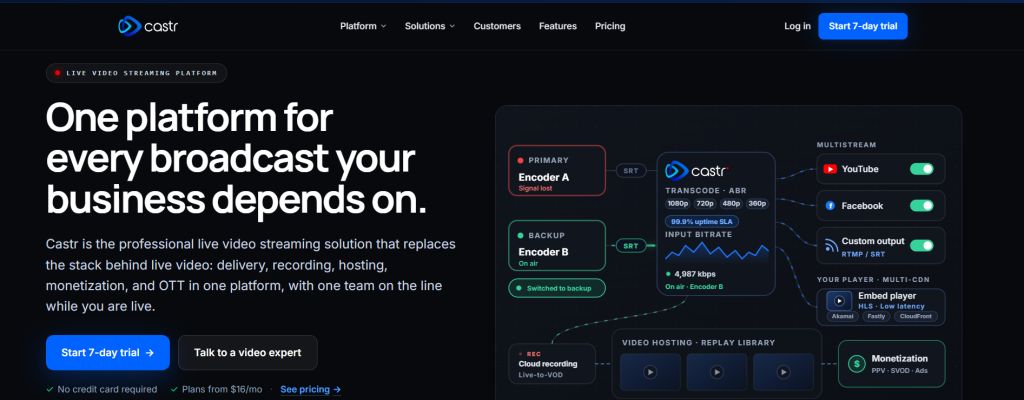
Castr is a hybrid platform for live streaming and on-demand video. Its strength is in private live event streaming (e.g., virtual screenings, conferences, internal webcasts) combined with VOD hosting. Castr covers a gap: many VOD hosts don’t support secure live streaming, and many live platforms don’t offer strong privacy controls.
Anonymous and Security Features
- Castr’s private live streaming uses a robust embed player (powered by Akamai CDN) that supports password protection, referrer (domain) checking, and geo-blocking.
- During a live event, you can restrict access to invited viewers via a login or password gate.
- For VOD, Castr also offers domain whitelisting and password protection.
- By default, Castr does not publicly list private videos. It does not have DRM or watermarking; its focus is on stream-level locks.
Privacy for Uploaders
Castr’s embeds are lightweight (no built-in ads or recommendations). It supports SSO/logins through its API for securing events. As a lesser-known platform, it doesn’t aggressively market or monetize viewer data.
Temporary Hosting
You can schedule one-time VOD or auto-expiring events. The platform lets you set time-limited live events and delete recordings after broadcast.
Additional Features
- Castr offers multi-streaming to 30+ destinations (while keeping the main stream private)
- Low-latency and backup ingest
- Comprehensive analytics for both live and VOD content.
Pricing
- Starter: $16.67 /month
- Standard: $41.67 /month
- Premium: $166.67 /month
- Ultra: $291.67 /month
- Events: $624.99 /month
Cons
- Castr’s security is not as advanced as DRM-focused services.
- It lacks multi-DRM and forensic watermarking on VOD.
- It also requires some technical setup for live events.
- It does provide the basics (passwords, domain locks, geo-blocks), which are uncommon in pure live-streaming tools.
Best for: Organizations that need private live events plus secure playback. Think internal corporate broadcasts, private product launches, virtual cinemas, or investor webinars. If you need to stream live to an audience securely, then have the replay available only to the same audience, Castr is a leading choice. For purely on-demand video (especially if high-level DRM is required), other platforms (like Waya or VdoCipher) may be more appropriate.
Anonymous Video Hosting Platform Comparison Table
Below is a high-level feature comparison. All platforms support domain restrictions and password gating to some extent, but Waya Stream and VdoCipher lead on anti-piracy, while Spotlightr and Vimeo excel on simplicity:
| Feature | Waya Stream | VdoCipher | Spotlightr | Vimeo Business | Castr |
| DRM (Widevine/FairPlay/PlayReady) | Full stack | Full stack | Partial | No | No |
| Dynamic watermarking | Yes | Yes | No | No | No |
| Expiring tokenized links | Yes | Partial | No | No | No |
| Domain locking | Yes | Yes | Yes | Yes | Yes |
| Password protection | Yes | Yes | Yes | Yes | Yes |
| SSO / 2FA | Yes | Partial | No | Enterprise only | No |
| RBAC | Yes | Yes | Basic | Basic | Basic |
| Full access logs/audit trail | Yes | Partial | Basic | Basic | Basic |
| Cookie-free embed | Yes | No | Partial | No | No |
| GDPR compliance | Yes | No | Partial | Partial | Partial |
| HIPAA / SOC 2 | Yes | Partial | No | No | No |
| Screen recording prevention | Yes (device-dep.) | Yes (device-dep.) | No | No | No |
| Geo-restrictions | Yes | Yes | No | No | Partial |
| White-label player | Yes | Yes | Yes | Yes | Partial |
| Live streaming private | Yes | Yes | No | Advanced plan | Yes |
| Monetization (SVOD/TVOD/PVOD) | Full | No | No | Limited | Partial |
| AI features | Yes | No | No | No | No |
How to Choose the Right Anonymous Video Hosting Platform
To pick the best platform for your needs, consider the following:
- What exactly do you need to protect? Content only, or identities too? If you need true anonymity (no logged data), look for cookie-free embeds and minimal account requirements. If compliance is your driver, focus on certified providers (GDPR, HIPAA, SOC 2).
- Content sensitivity level: Highly proprietary or secret footage (legal evidence, unreleased media) demands DRM, encryption, and watermarking. Casual usage (internal training videos) might suffice with expiring links and passwords.
- Viewer anonymity needs: If you don’t want to track who watches, prioritize platforms with no cookies/trackers or that allow anonymous access without login.
- Uploader anonymity needs: If you cannot be linked to uploads, use white-label platforms (no provider branding) and avoid accounts tied to your identity (some services let you upload via API key).
- Access control requirements: Ensure the platform supports expiring links or tokens, password gating, SSO, and fine-grained permissions as needed. Verify if you can revoke access mid-stream or extend expiries.
- Regulatory compliance: If subject to GDPR, HIPAA, etc., only use a provider that can legally host your data (ask for BAA, data residency, audit reports). Don’t assume, verify.
- Piracy vs. tracking: Decide if your threat is unauthorized downloading (use DRM) or secret sharing (use watermarking). A combination is best.
- Scale and team size: For large teams, RBAC, SSO/2FA, and audit logs are crucial. For single users or small teams, simpler platforms may suffice.
- Match to your use-case: Journalists might pick maximum anonymity (min tracking, token links); legal or healthcare require audit logs and formal compliance; educators want branding and ease of use.
- Red flags: Avoid platforms that lack DRM entirely, don’t publish compliance info, embed third-party tracking, or rely solely on static passwords. Also, beware of any clauses that state we own your content.
Anonymous Video Hosting Best Practices
When working with anonymous video hosting platforms, consider:
- Use multiple layers of security: Don’t rely on just one feature. Combine DRM, watermarking, expiring links plus passwords for mission-critical videos.
- Always domain-lock private embeds: Never just trust a link, especially on membership sites.
- Monitor access logs proactively: Treat them as a security tool, not just analytics. Look for anomalies (logins from new countries, multiple concurrent views) and revoke links if needed.
- Shorten access windows: Give the minimum necessary viewing time. The shorter the exposure, the lower the risk.
- Implement SSO for teams: For any organization with over ~10 users, integrate with your identity provider, so access automatically revokes when an employee leaves.
- Confirm compliance details upfront: Don’t just read marketing copy; request the certificate or BAA from your vendor.
- Check privacy settings: For GDPR, test an embed to make sure it doesn’t drop cookies without consent.
- Always watermark high-value content: Even with DRM, assume someone might screen-capture. Watermarking traces any leak back to the viewer.
- Regularly review permissions: As staff changes or projects end, update or delete video access and memberships.
- Use separate platforms for public vs. private video: Trust YouTube or LinkedIn for marketing outreach, but host sensitive content on a locked-down service. Never mix the two.
Frequently Asked Questions
What is the difference between anonymous video hosting and private video hosting?
Private video hosting usually means restricting access (passwords, hidden links). Anonymous hosting adds that the platform itself does not log or share any personal data about the uploader/viewers. It combines private delivery with data anonymity (no cookies, no stored identities).
Can a YouTube unlisted video be considered private or anonymous?
No.
Unlisted YouTube videos are only hidden from search, but anyone with the link can watch, and YouTube still tracks and serves ads. They rely on obscurity, not security. In 2026, experts advise never to trust an unlisted status for anything sensitive.
What does DRM actually protect against?
DRM encrypts the video stream so that only authorized players/devices can decrypt it. It prevents downloading or copying the video file. DRM also lets the platform revoke playback at the OS level. It defends against most downloaders and simple hacks, though it can’t stop a determined screen-record. Without DRM, no-download settings are easily bypassed.
Can someone still record my DRM-protected video using a screen capture tool?
On desktops: yes, basic screen-capture can record anything you see. On mobile devices, good DRM (FairPlay/Widevine) can block native screen-record functions. But because perfect prevention isn’t possible, dynamic watermarking is used as a second layer. If someone does screen-record on any device, their viewer ID is visibly or invisibly watermarked in the video stream.
What is a tokenized or expiring video link?
It’s a special URL that contains a secure token (often signed and time-limited). The host checks this token on each playback request. Once the token expires (after a set time, date, or number of plays), the link stops working. This ensures that even if the link is shared, access will be denied after its validity window.
What is the difference between SSO and password protection for video access?
Password protection means anyone with the password can view the video (until they share it). SSO (Single Sign-On) ties video access to an authenticated corporate account. SSO is stronger for organizations: it ensures only enrolled members (via Okta, Azure AD, etc.) can watch, and access automatically adjusts when someone joins/leaves the company. SSO is essentially group-based authentication, whereas a password is shared-key access.
Do I need to be technical to set up anonymous video hosting?
Not necessarily.
Many platforms make this user-friendly via web dashboards. Basic tasks (uploading, setting a password, and domain lock) are point-and-click. However, features like DRM or API-based token creation may require some technical steps. If you need advanced controls (signed URLs, SSO integration), you might need IT support. That said, vendors provide documentation or managed support to help.
What happens to my video data when I delete it from a hosting platform?
Check the provider’s deletion policies. A privacy-minded platform should fully wipe your files from their CDN and storage (not just unlist them) once you delete. Ideally, they confirm purge on all edge caches. For truly sensitive content, ask how long backups or logs persist after deletion.
Final Thoughts on Anonymous Video Hosting Platforms
Anonymous video hosting in 2026 is no longer a fringe concern; it’s a necessity for anyone handling sensitive video.
From unlisted pitfalls to full DRM stacks, video privacy sits on a spectrum. On one end is merely hiding a link; on the other end is encryption, signed expiring links, watermarking, and audited logs.
Hence, match the platform to your threat:
- If you worry about unauthorized sharing and leaks, prioritize DRM and watermarking.
- If you worry about your users’ privacy, insist on no cookies and minimal data retention.
- If compliance is at stake, look for certifications and contractual guarantees.
However, Waya Stream is the most complete all-in-one solution for serious security and compliance needs. VdoCipher excels at piracy prevention with Hollywood-grade DRM.
Spotlightr is the top pick for course creators and membership sites needing easy, private hosting. Vimeo Business/Advanced gives creative teams a polished, private environment with basic controls. Castr stands out for private live events and secure VOD replays.
To get started, audit your current video hosting setup against the checklist above. Identify missing security layers. Try a trial of the platform that closes those gaps. The right anonymous video host will feel invisible, protecting your content quietly in the background while you control exactly who sees it.